Objective
This how-to guide will help you to generate mobile-responsive HTML markup for your DocFusion templates. The resulting HTML is W3C-compliant, and renders in browsers or email clients on any device.
Hyper-Text Markup Language, or HTML, is the standard markup language for documents designed to be displayed in a web browser. It can be assisted by technologies such as Cascading Style Sheets (CSS) and scripting languages such as JavaScript (JS).
Source: Wikipedia
Hyper-Text Markup Language, or HTML, is the standard markup language for documents designed to be displayed in a web browser. It can be assisted by technologies such as Cascading Style Sheets (CSS) and scripting languages such as JavaScript (JS).
Source: Wikipedia
Hyper-Text Markup Language, or HTML, is the standard markup language for documents designed to be displayed in a web browser. It can be assisted by technologies such as Cascading Style Sheets (CSS) and scripting languages such as JavaScript (JS).
Source: Wikipedia
Hyper-Text Markup Language, or HTML, is the standard markup language for documents designed to be displayed in a web browser. It can be assisted by technologies such as Cascading Style Sheets (CSS) and scripting languages such as JavaScript (JS).
Source: Wikipedia
Hyper-Text Markup Language, or HTML, is the standard markup language for documents designed to be displayed in a web browser. It can be assisted by technologies such as Cascading Style Sheets (CSS) and scripting languages such as JavaScript (JS).
Source: Wikipedia
Hyper-Text Markup Language, or HTML, is the standard markup language for documents designed to be displayed in a web browser. It can be assisted by technologies such as Cascading Style Sheets (CSS) and scripting languages such as JavaScript (JS).
Source: Wikipedia
HTML mode is an advanced feature of DocFusion. It generates HTML markup from your template content and gives you direct access to the document’s stylesheet to customize the mobile breakpoints, layout and styling using CSS properties. During document generation, you have the option to format your documents as HTML pages or email bodies.
DocFusion is a document generation engine that automates the documentation process, electronic signatures, document workflows, and secure storage for business documents.
Read more at www.docfusioncloud.com
Cascading Style Sheets (CSS) is a style sheet language used for describing the presentation of a document written in a markup language such as HTML or XML. CSS is a cornerstone technology of the World Wide Web, alongside HTML and JavaScript.
Source: Wikipedi
DocFusion is a document generation engine that automates the documentation process, electronic signatures, document workflows, and secure storage for business documents.
Read more at www.docfusioncloud.com
Cascading Style Sheets (CSS) is a style sheet language used for describing the presentation of a document written in a markup language such as HTML or XML. CSS is a cornerstone technology of the World Wide Web, alongside HTML and JavaScript.
Source: Wikipedia
DocFusion is a document generation engine that automates the documentation process, electronic signatures, document workflows, and secure storage for business documents.
Read more at www.docfusioncloud.com
Cascading Style Sheets (CSS) is a style sheet language used for describing the presentation of a document written in a markup language such as HTML or XML. CSS is a cornerstone technology of the World Wide Web, alongside HTML and JavaScript.
Source: Wikipedia
DocFusion is a document generation engine that automates the documentation process, electronic signatures, document workflows, and secure storage for business documents.
Read more at www.docfusioncloud.com
Cascading Style Sheets (CSS) is a style sheet language used for describing the presentation of a document written in a markup language such as HTML or XML. CSS is a cornerstone technology of the World Wide Web, alongside HTML and JavaScript.
Source: Wikipedia
DocFusion is a document generation engine that automates the documentation process, electronic signatures, document workflows, and secure storage for business documents.
Read more at www.docfusioncloud.com
Cascading Style Sheets (CSS) is a style sheet language used for describing the presentation of a document written in a markup language such as HTML or XML. CSS is a cornerstone technology of the World Wide Web, alongside HTML and JavaScript.
So
DocFusion is a document generation engine that automates the documentation process, electronic signatures, document workflows, and secure storage for business documents.
Read more at www.docfusioncloud.com
Cascading Style Sheets (CSS) is a style sheet language used for describing the presentation of a document written in a markup language such as HTML or XML. CSS is a cornerstone technology of the World Wide Web, alongside HTML and JavaScript.
Source: Wikipedi
Cascading Style Sheets (CSS) is a style sheet language used for describing the presentation of a document written in a markup language such as HTML or XML. CSS is a cornerstone technology of the World Wide Web, alongside HTML and JavaScript.
Source: Wikipedia
Simple & Complex HTML modes
HTML Mode in DocFusion allows for 2 modes of operation that cater to different use-cases. ‘Simple’ mode generates HTML for your template content, while ‘Complex’ mode helps you to customize the HTML Document Object Model (DOM) dynamically.
It is recommended that you assess your requirements to choose which mode to use. If you’re unsure which is appropriate for your use-case, please also refer to the tutorial: “
Designing Custom HTML Templates in DocFusion”.
Availability
HTML Mode and its related features are available on:
| DocFusion Cloud | DocFusion 365 | DocFusion On Premises |
|---|
| Template Designer Version | 2022.3.0.91 or later | 2022.3.0.91 or later | 2022.3.0.91 or later |
| Workbench Version | 2022.3.0.91 or later | 2022.3.0.91 or later | 2022.3.0.91 or later |
| Workflow Designer Version | 2022.3.0.91 or later | 2022.3.0.91 or later | 2022.3.0.91 or later |
Accessing HTML Mode
HTML mode is an advanced feature of Template Designer.
DocFusion Template Designer provides an intuitive way to extend documents composed with Microsoft Word into dynamic templates. It is embedded within the familiar interface of Microsoft Word and uses Smart-Parts to facilitate the process of connecting your content to online or enterprise databases.
DocFusion Template Designer provides an intuitive way to extend documents composed with Microsoft Word into dynamic templates. It is embedded within the familiar interface of Microsoft Word and uses Smart-Parts to facilitate the process of connecting your content to online or enterprise databases.
DocFusion Template Designer provides an intuitive way to extend documents composed with Microsoft Word into dynamic templates. It is embedded within the familiar interface of Microsoft Word and uses Smart-Parts to facilitate the process of connecting your content to online or enterprise databases.
DocFusion Template Designer provides an intuitive way to extend documents composed with Microsoft Word into dynamic templates. It is embedded within the familiar interface of Microsoft Word and uses Smart-Parts to facilitate the process of connecting your content to online or enterprise databases.
DocFusion Template Designer provides an intuitive way to extend documents composed with Microsoft Word into dynamic templates. It is embedded within the familiar interface of Microsoft Word and uses Smart-Parts to facilitate the process of connecting your content to online or enterprise databases.
DocFusion Template Designer provides an intuitive way to extend documents composed with Microsoft Word into dynamic templates. It is embedded within the familiar interface of Microsoft Word and uses Smart-Parts to facilitate the process of connecting your content to online or enterprise databases.
DocFusion Template Designer provides an intuitive way to extend documents composed with Microsoft Word into dynamic templates. It is embedded within the familiar interface of Microsoft Word and uses Smart-Parts to facilitate the process of connecting your content to online or enterprise databases.
DocFusion Template Designer provides an intuitive way to extend documents composed with Microsoft Word into dynamic templates. It is embedded within the familiar interface of Microsoft Word and uses Smart-Parts to facilitate the process of connecting your content to online or enterprise databases.
DocFusion Template Designer provides an intuitive way to extend documents composed with Microsoft Word into dynamic templates. It is embedded within the familiar interface of Microsoft Word and uses Smart-Parts to facilitate the process of connecting your content to online or enterprise databases.
DocFusion Template Designer provides an intuitive way to extend documents composed with Microsoft Word into dynamic templates. It is embedded within the familiar interface of Microsoft Word and uses Smart-Parts to facilitate the process of connecting your content to online or enterprise databases.
DocFusion Template Designer provides an intuitive way to extend documents composed with Microsoft Word into dynamic templates. It is embedded within the familiar interface of Microsoft Word and uses Smart-Parts to facilitate the process of connecting your content to online or enterprise databases.
DocFusion Template Designer provides an intuitive way to extend documents composed with Microsoft Word into dynamic templates. It is embedded within the familiar interface of Microsoft Word and uses Smart-Parts to facilitate the process of connecting your content to online or enterprise databases.
DocFusion Template Designer provides an intuitive way to extend documents composed with Microsoft Word into dynamic templates. It is embedded within the familiar interface of Microsoft Word and uses Smart-Parts to facilitate the process of connecting your content to online or enterprise databases.
DocFusion Template Designer provides an intuitive way to extend documents composed with Microsoft Word into dynamic templates. It is embedded within the familiar interface of Microsoft Word and uses Smart-Parts to facilitate the process of connecting your content to online or enterprise databases.
If you’re unfamiliar with Template Designer, take a
Quick Tour.
Steps
Step 1: Enable HTML Mode for your DocFusion TemplateHTML Mode is useful to make your dynamically generated content available online, or through media-rich email. DocFusion eliminates the need for programming by generating HTML markup from the content of your templates.
DocFusion Template's are documents with content that is dynamically generated to suit a business or use-case. It contains Smart-Parts, which allows the value of content to be sourced from online databases or other apps.
HTML Mode is useful to make your dynamically generated content available online, or through media-rich email. DocFusion eliminates the need for programming by generating HTML markup from the content of your templates.
DocFusion Template's are documents with content that is dynamically generated to suit a business or use-case. It contains Smart-Parts, which allows the value of content to be sourced from online databases or other apps.
HTML Mode is useful to make your dynamically generated content available online, or through media-rich email. DocFusion eliminates the need for programming by generating HTML markup from the content of your templates.
DocFusion Template's are documents with content that is dynamically generated to suit a business or use-case. It contains Smart-Parts, which allows the value of content to be sourced from online databases or other apps.
HTML Mode is useful to make your dynamically generated content available online, or through media-rich email. DocFusion eliminates the need for programming by generating HTML markup from the content of your templates.
DocFusion Template's are documents with content that is dynamically generated to suit a business or use-case. It contains Smart-Parts, which allows the value of content to be sourced from online databases or other apps.
HTML Mode is useful to make your dynamically generated content available online, or through media-rich email. DocFusion eliminates the need for programming by generating HTML markup from the content of your templates.
DocFusion Template's are documents with content that is dynamically generated to suit a business or use-case. It contains Smart-Parts, which allows the value of content to be sourced from online databases or other apps.
HTML Mode is useful to make your dynamically generated content available online, or through media-rich email. DocFusion eliminates the need for programming by generating HTML markup from the content of your templates.
DocFusion Template's are documents with content that is dynamically generated to suit a business or use-case. It contains Smart-Parts, which allows the value of content to be sourced from online databases or other apps.
HTML Mode is useful to make your dynamically generated content available online, or through media-rich email. DocFusion eliminates the need for programming by generating HTML markup from the content of your templates.
DocFusion Template's are documents with content that is dynamically generated to suit a business or use-case. It contains Smart-Parts, which allows the value of content to be sourced from online databases or other apps.
HTML Mode is useful to make your dynamically generated content available online, or through media-rich email. DocFusion eliminates the need for programming by generating HTML markup from the content of your templates.
DocFusion Template's are documents with content that is dynamically generated to suit a business or use-case. It contains Smart-Parts, which allows the value of content to be sourced from online databases or other apps.
HTML Mode is useful to make your dynamically generated content available online, or through media-rich email. DocFusion eliminates the need for programming by generating HTML markup from the content of your templates.
DocFusion Template's are documents with content that is dynamically generated to suit a business or use-case. It contains Smart-Parts, which allows the value of content to be sourced from online databases or other apps.
HTML Mode is useful to make your dynamically generated content available online, or through media-rich email. DocFusion eliminates the need for programming by generating HTML markup from the content of your templates.
DocFusion Template's are documents with content that is dynamically generated to suit a business or use-case. It contains Smart-Parts, which allows the value of content to be sourced from online databases or other apps.
HTML Mode is useful to make your dynamically generated content available online, or through media-rich email. DocFusion eliminates the need for programming by generating HTML markup from the content of your templates.
DocFusion Template's are documents with content that is dynamically generated to suit a business or use-case. It contains Smart-Parts, which allows the value of content to be sourced from online databases or other apps.
HTML Mode is useful to make your dynamically generated content available online, or through media-rich email. DocFusion eliminates the need for programming by generating HTML markup from the content of your templates.
DocFusion Template's are documents with content that is dynamically generated to suit a business or use-case. It contains Smart-Parts, which allows the value of content to be sourced from online databases or other apps.
HTML Mode is useful to make your dynamically generated content available online, or through media-rich email. DocFusion eliminates the need for programming by generating HTML markup from the content of your templates.
DocFusion Template's are documents with content that is dynamically generated to suit a business or use-case. It contains Smart-Parts, which allows the value of content to be sourced from online databases or other apps.
If you are enabling HTML mode on an existing DocFusion template…
- Open DocFusion Workbench. In the ‘Workbench Items’ pane navigate the list of available servers to your tenancy. Click it to select, then in the menu-bar, click ‘Repository’, and ‘Logon’. Enter your credentials and click ‘Ok’. You should be able to see the templates and other DocFusion items in your repository list now.
- In the list of DocFusion items, find the template that you would like to enable HTML mode on. Select it and navigate to ‘Items’ in the menu-bar. Click ‘Check-Out’. This step ensures that the file is locked so that others cannot make changes while you're busy working on it.
- The dialog box will prompt you to confirm the check-out operation. If there are no errors, click ‘Next’ and ‘Finish’. The dialog box will close.
- With the template still selected in the Workbench items list, click ‘Edit’ in the ‘Items’ menu. Your template will open in Microsoft Word.
- In the Microsoft Word menu-bar find the item labelled ‘DocFusion’. Click it to navigate to the DocFusion ribbon.
- Scan for the ‘Advanced’ group of tools in the ribbon bar. The first available tool is labelled ‘Enable HTML Mode’. Click it. The HTML Settings window will open. Your document is now HTML Mode enabled.
If you are creating a new DocFusion template to enable HTML mode on…
- Open Microsoft Word and create a new document by clicking File > New. Select ‘Blank Document’ from the list of available templates and a new document will be made available in the editor.
- In the Microsoft Word menu-bar find the item labelled ‘DocFusion’. Click it to navigate to the DocFusion ribbon.
- Next, click ‘Extend’ in the DocFusion ribbon bar. This operation extends ordinary Microsoft Word documents for dynamic content generation using DocFusion. Once DocFusion loads, the ribbon bar will have extended to include several tools.
- Scan for the ‘Advanced’ group of tools in the DocFusion ribbon bar. The first available tool is labelled ‘Enable HTML Mode’. Click it. The HTML Settings window will open. Your document is now HTML Mode enabled.
Step 2: (Optional) Design your content
Using an existing DocFusion template?
HTML Mode in DocFusion honours all layout and formatting that you use in Microsoft Word’s WYSIWYG editor. Proceed with designing your document as needed. All DocFusion Smart-Parts are available for use in HTML mode. Please refer to the Template Designer usage guide to create dynamic content for your template.
WYSIWYG is an acronym for 'What You See Is What You Get'. In computing, it refers to systems in which editing software allows content to be edited in a form that resembles its appearance when printed or displayed as a finished product, such as a printed document, web page, or slide presentation.
Source: Wikipedia
WYSIWYG is an acronym for 'What You See Is What You Get'. In computing, it refers to systems in which editing software allows content to be edited in a form that resembles its appearance when printed or displayed as a finished product, such as a printed document, web page, or slide presentation.
Source: Wikipedia
WYSIWYG is an acronym for 'What You See Is What You Get'. In computing, it refers to systems in which editing software allows content to be edited in a form that resembles its appearance when printed or displayed as a finished product, such as a printed document, web page, or slide presentation.
Source: Wikipedia
Step 3: (Optional) Set mobile-responsiveness for your HTML template
To make your HTML document adapt its layout for tablet and mobile devices:
- Navigate to the ‘HTML Settings’ window. If it isn’t open, click ‘Edit HTML Settings’ in the DocFusion ribbon bar. It can be found in the ‘Advanced’ group of tools.
- Click the ‘Breakpoints’ tab. By default you will see a list of 3 CSS breakpoints; viz: mobile, tablet and desktop. The Max Width setting specifies their breakpoints in pixels.
- Click any of the values on the Max Width column to adjust the breakpoints for corresponding devices.
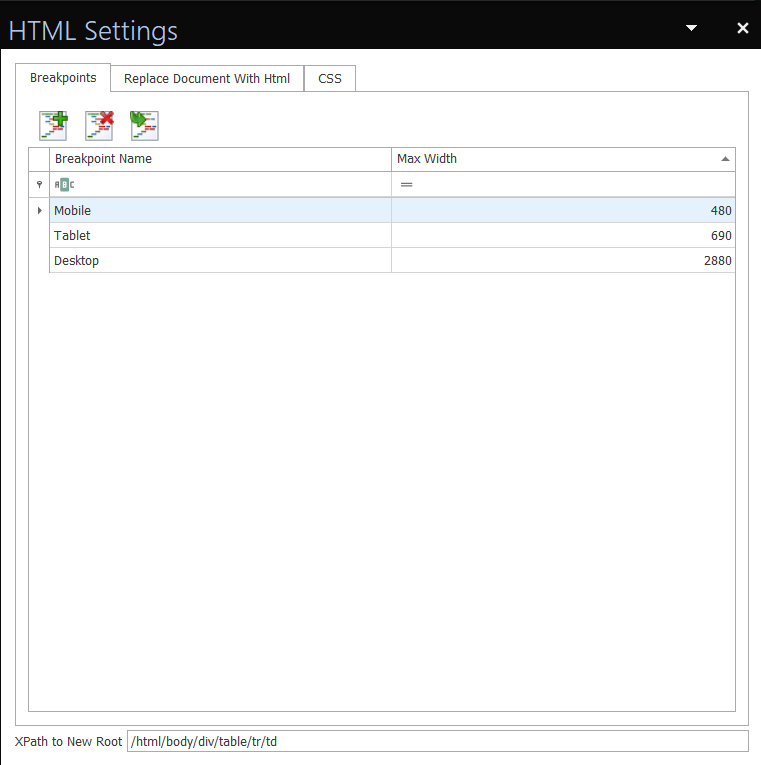 HTML Settings window is only available when HTML mode is set.
To add breakpoints for unlisted devices:
- In the toolbar on the Breakpoints tab, click ‘Add Breakpoint’. A new row will be added to the list of breakpoints.
- In the ‘Breakpoint Name’ column for the row that was just added, click to type in a name of the device that you would like to set a breakpoint for. The name value is a text string that can be set to any description you see fit to describe this breakpoint.
- Next, in the ‘Max Width’ column for the row that was just added, type in a pixel value for your new breakpoint. This must be an integer value that defines the width of the screen you will be displaying your HTML document on.
- Continue adding new breakpoints by repeating operations 1 to 3 above.
To delete a breakpoint:
- Select the breakpoint that you would like to delete by clicking the row in the breakpoint’s table.
- Click ‘Delete Breakpoint’ in the tools above the table, on the ‘Breakpoints’ tab.
Step 4: (Optional) Add custom CSSCascading Style Sheets (CSS) is a style sheet language used for describing the presentation of a document written in a markup language such as HTML or XML. CSS is a cornerstone technology of the World Wide Web, alongside HTML and JavaScript.
Source: Wikipedia
Cascading Style Sheets (CSS) is a style sheet language used for describing the presentation of a document written in a markup language such as HTML or XML. CSS is a cornerstone technology of the World Wide Web, alongside HTML and JavaScript.
Source: Wikipedia
Cascading Style Sheets (CSS) is a style sheet language used for describing the presentation of a document written in a markup language such as HTML or XML. CSS is a cornerstone technology of the World Wide Web, alongside HTML and JavaScript.
Source: Wikipedia
Cascading Style Sheets (CSS) is a style sheet language used for describing the presentation of a document written in a markup language such as HTML or XML. CSS is a cornerstone technology of the World Wide Web, alongside HTML and JavaScript.
Source: Wikipedia
Cascading Style Sheets (CSS) is a style sheet language used for describing the presentation of a document written in a markup language such as HTML or XML. CSS is a cornerstone technology of the World Wide Web, alongside HTML and JavaScript.
Source: Wikipedia
Cascading Style Sheets (CSS) is a style sheet language used for describing the presentation of a document written in a markup language such as HTML or XML. CSS is a cornerstone technology of the World Wide Web, alongside HTML and JavaScript.
Source: Wikipedia
Cascading Style Sheets (CSS) is a style sheet language used for describing the presentation of a document written in a markup language such as HTML or XML. CSS is a cornerstone technology of the World Wide Web, alongside HTML and JavaScript.
Source: Wikipedia
Cascading Style Sheets (CSS) is a style sheet language used for describing the presentation of a document written in a markup language such as HTML or XML. CSS is a cornerstone technology of the World Wide Web, alongside HTML and JavaScript.
Source: Wikipedia
Cascading Style Sheets (CSS) is a style sheet language used for describing the presentation of a document written in a markup language such as HTML or XML. CSS is a cornerstone technology of the World Wide Web, alongside HTML and JavaScript.
Source: Wikipedia
Cascading Style Sheets (CSS) is a style sheet language used for describing the presentation of a document written in a markup language such as HTML or XML. CSS is a cornerstone technology of the World Wide Web, alongside HTML and JavaScript.
Source: Wikipedia
Cascading Style Sheets (CSS) is a style sheet language used for describing the presentation of a document written in a markup language such as HTML or XML. CSS is a cornerstone technology of the World Wide Web, alongside HTML and JavaScript.
Source: Wikipedia
Cascading Style Sheets (CSS) is a style sheet language used for describing the presentation of a document written in a markup language such as HTML or XML. CSS is a cornerstone technology of the World Wide Web, alongside HTML and JavaScript.
Source: Wikipedia
Cascading Style Sheets (CSS) is a style sheet language used for describing the presentation of a document written in a markup language such as HTML or XML. CSS is a cornerstone technology of the World Wide Web, alongside HTML and JavaScript.
Source: Wikipedia
In HTML mode, you have access to the template’s stylesheet to add CSS styling rules for your document. Note that this feature is optional since DocFusion will honour any styling you set in Microsoft Word’s WYSIWYG editor.
WYSIWYG is an acronym for 'What You See Is What You Get'. In computing, it refers to systems in which editing software allows content to be edited in a form that resembles its appearance when printed or displayed as a finished product, such as a printed document, web page, or slide presentation.
Source: Wikipedia
WYSIWYG is an acronym for 'What You See Is What You Get'. In computing, it refers to systems in which editing software allows content to be edited in a form that resembles its appearance when printed or displayed as a finished product, such as a printed document, web page, or slide presentation.
Source: Wikipedia
WYSIWYG is an acronym for 'What You See Is What You Get'. In computing, it refers to systems in which editing software allows content to be edited in a form that resembles its appearance when printed or displayed as a finished product, such as a printed document, web page, or slide presentation.
Source: Wikipedia
WYSIWYG is an acronym for 'What You See Is What You Get'. In computing, it refers to systems in which editing software allows content to be edited in a form that resembles its appearance when printed or displayed as a finished product, such as a printed document, web page, or slide presentation.
Source: Wikipedi
TIP: Finding CSS selectors
To find CSS selectors for content in your document, preview the document and use ‘Developer Tools’ in your browser to inspect specific elements.
To set CSS styling rules for your template:
- Navigate to the ‘CSS’ tab in the ‘HTML Settings’ window. You will be presented with a blank editor.
- Type in any CSS rules you want to enforce for the document’s content. Changes are saved when you save your Microsoft Word document.
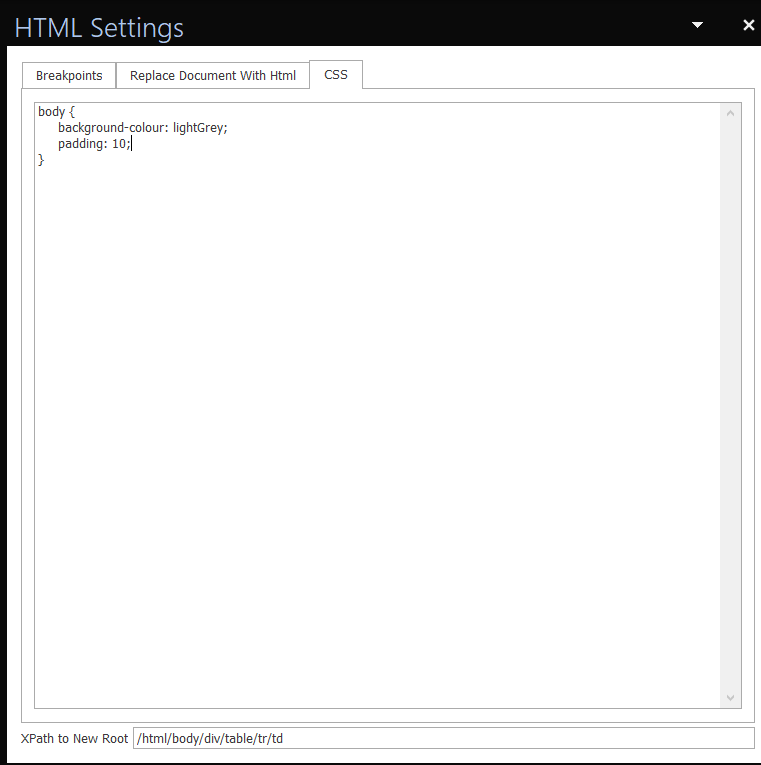 Write CSS rules in the editor.
Step 5: Preview your document
Your template is now ready for previewing. This step helps you to verify that the HTML generated by DocFusion renders as expected in browsers and email clients.
TIP: Use a scenario that matches your business process
If you’ve used
Smart Partsin your document template then you can configure input data for your preview using the ‘Scenarios’ feature. You can access it by clicking the down-arrow alongside the ‘Preview’ button.
Smart-Parts are intelligent pieces of content used in DocFusion templates. They help to build business intelligence directly into documents.
Smart-Parts are intelligent pieces of content used in DocFusion templates. They help to build business intelligence directly into documents.
Smart-Parts are intelligent pieces of content used in DocFusion templates. They help to build business intelligence directly into documents.
Smart-Parts are intelligent pieces of content used in DocFusion templates. They help to build business intelligence directly into documents.
Smart-Parts are intelligent pieces of content used in DocFusion templates. They help to build business intelligence directly into documents.
Smart-Parts are intelligent pieces of content used in DocFusion templates. They help to build business intelligence directly into documents.
Smart-Parts are intelligent pieces of content used in DocFusion templates. They help to build business intelligence directly into documents.
Smart-Parts are intelligent pieces of content used in DocFusion templates. They help to build business intelligence directly into documents.
Smart-Parts are intelligent pieces of content used in DocFusion templates. They help to build business intelligence directly into documents.
Smart-Parts are intelligent pieces of content used in DocFusion templates. They help to build business intelligence directly into documents.
Smart-Parts are intelligent pieces of content used in DocFusion templates. They help to build business intelligence directly into documents.
Smart-Parts are intelligent pieces of content used in DocFusion templates. They help to build business intelligence directly into documents.
Smart-Parts are intelligent pieces of content used in DocFusion templates. They help to build business intelligence directly into documents.
To preview your document as an HTML page…
- Navigate to the ‘DocFusion’ ribbon menu. Scan the ‘View’ group for a setting labelled ‘Type’. It sets the output format for your template. From the dropdown, select ‘HTML’.
- Now click ‘Preview’ just below it.
To preview your document as an email…
- Navigate to the ‘DocFusion’ ribbon menu. Scan the ‘View’ group for a setting labelled ‘Type’. It sets the output format for your template. From the dropdown, select ‘EMAIL.
- Now click ‘Preview’ just below it.
Your default email client will be opened. Your document will form the body of an email message.
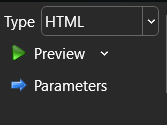 Type & Preview settings.
Review
HTML Mode is useful to make your dynamically generated content available online, or through media-rich email. HTML suits these use-cases well since it is portable and adapts its layout to mobile devices when used with CSS.
HTML Mode is useful to make your dynamically generated content available online, or through media-rich email. DocFusion eliminates the need for programming by generating HTML markup from the content of your templates.
Hyper-Text Markup Language, or HTML, is the standard markup language for documents designed to be displayed in a web browser. It can be assisted by technologies such as Cascading Style Sheets (CSS) and scripting languages such as JavaScript (JS).
Source: Wikipedia
Cascading Style Sheets (CSS) is a style sheet language used for describing the presentation of a document written in a markup language such as HTML or XML. CSS is a cornerstone technology of the World Wide Web, alongside HTML and JavaScript.
Source: Wikiped
HTML Mode is useful to make your dynamically generated content available online, or through media-rich email. DocFusion eliminates the need for programming by generating HTML markup from the content of your templates.
Hyper-Text Markup Language, or HTML, is the standard markup language for documents designed to be displayed in a web browser. It can be assisted by technologies such as Cascading Style Sheets (CSS) and scripting languages such as JavaScript (JS).
Source: Wikipedia
Cascading Style Sheets (CSS) is a style sheet language used for describing the presentation of a document written in a markup language such as HTML or XML. CSS is a cornerstone technology of the World Wide Web, alongside HTML and JavaScript.
Source: Wikipedia
Creating HTML documents that render well in browsers on a variety of devices does however require a level of skill. In HTML mode, DocFusion eliminates the need for programming by generating HTML markup from the content of your templates. You can proceed with designing media-rich content using the WYSIWYG editor in Microsoft Word, and DocFusion will honour those styles in the generated HTML.
NOTE: Converting your templates to HTML is not pixel-perfect.
HTML Mode in DocFusion prefers compliance to HTML standards so that your content is compatible with the widest range of browsers. Compatibility is also extended to popular email clients.
If, however, you do need refined control over the structure of your HTML and it’s styling, DocFusion provides several advanced tools which are covered in the tutorial “Designing Custom HTML Templates in DocFusion”.
Hyper-Text Markup Language, or HTML, is the standard markup language for documents designed to be displayed in a web browser. It can be assisted by technologies such as Cascading Style Sheets (CSS) and scripting languages such as JavaScript (JS).
Source: Wikipedia
DocFusion is a document generation engine that automates the documentation process, electronic signatures, document workflows, and secure storage for business documents.
Read more at www.docfusioncloud.com
Cascading Style Sheets (CSS) is a style sheet language used for describing the presentation of a document written in a markup language such as HTML or XML. CSS is a cornerstone technology of the World Wide Web, alongside HTML and JavaScript.
Source: Wikipedia
HTML Mode is useful to make your dynamically generated content available online, or through media-rich email. DocFusion eliminates the need for programming by generating HTML markup from the content of your templates.
DocFusion Template's are documents with content that is dynamically generated to suit a business or use-case. It contains Smart-Parts, which allows the value of content to be sourced from online databases or other apps.
WYSIWYG is an acronym for 'What You See Is What You Get'. In computing, it refers to systems in which editing software allows content to be edited in a form that resembles its appearance when printed or displayed as a finished product, such as a printed document, web page, or slide presentation.
Source: Wikipedia
Smart-Parts are intelligent pieces of content used in DocFusion templates. They help to build business intelligence directly into documents.