The Data Model pane is a Template Designer tool that connects to, and organizes, data sources and related properties for use as variable data in your DocFusion template. It is easily navigated using the hierarchical structure. DocFusion connectors to enterprise systems and online data sources can also be accessed from the Data Model pane.
Data Model pane
To open the Data Model pane, click Data Model in the View group the DocFusion ribbon bar. The pane opens to the right of the document canvas.
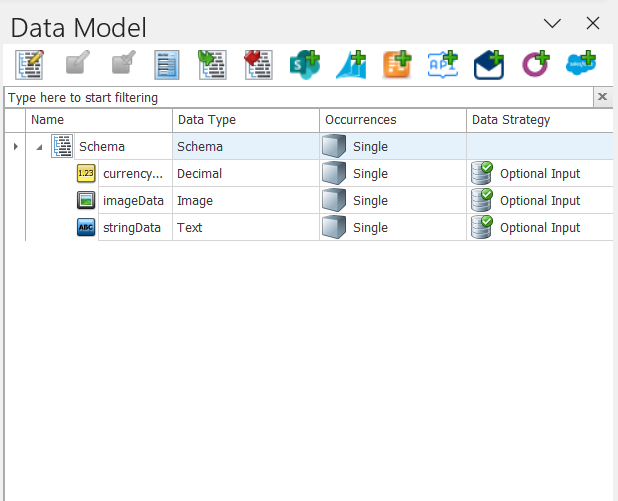
The Data Model pane consists of 2 parts:
1. Toolbar: Commands to work with schema properties and complex types. You can also access DocFusion connectors to REST endpoints or enterprise systems like Microsoft SharePoint, SalesForce and more.
2. Data Model: Displays any properties, entity types and data source connectors that have been added to the template's schema.
Toolbar
The Data Model toolbar contains the following commands:
| Command | Usage |
|---|---|
| Edit Entity | Opens the Schema Properties window to add, update, delete and copy schema properties. |
| Edit Property | Opens the Property Editor to update attributes of the selected schema property. |
| Show Property Usages | Opens the Data Model Usages panel that lists all instances of the selected property's usage in the template. |
| Show Types | Opens the Types window which lists all the standard and custom entity types (data types) in the template. |
| Import | Opens the Import Wizard to add data sources or properties to the current template's data model. |
| Export | Opens the Export dialog to backup the current template's data model to file. |
| Create a SharePoint Property | Connects to Microsoft SharePoint to use as a data source. |
| Create a Dynamics 365 Property | Connects to Microsoft Dynamics 365 to use as a data source. |
| Create an OData Property | Connects to databases using Open Data (OData) protocol to use as a data source. |
| Create an OpenAPI Property | Connects to REST/OpenAPI endpoints to use as a data source. |
| Create a WebServices Property | Connects to various types of web services to use as data sources. |
| Create an Odoo Property | Connects to Odoo ERP to use as a data source. |
| Create a SalesForce Property | Connects to SalesForce instances to use sObjects as data sources. |
Data Model
Below the toolbar is a list of connected data sources and related properties that are used as variable data in your DocFusion template. Collections of these properties are called a schema. The list of schemas and their properties are organized as a hierarchical view that can be expanded and collapsed to make working with large data models easier.
Use the search bar to quickly filter schema properties.

The columns in the data model table displays the main attributes of each property added to the template's schema. They are:
- The property Name,
- The defined Data Type, which is the standard or custom data type definition for the property,
- Occurrences, indicates how the data or entities are used in the template schema,
- and the Data Strategy, which indicates what the return types for properties and entities are.
The Working with schema properties guide provides more detail about property settings.
Related Articles
- Overview of Data Models in DocFusion
- Working with schema properties
- Importing a data schema
- Exporting a data schema