These DocFusion workflow activities allows for the configuration and initiation of Signiflow signing requests for documents. All activities can be found in the SigniFlow section of the Workflow Designer Toolbox.
Exceptions are thrown for configuration settings that fail validation, or any other error condition.
For instructions to setup a typical DocFusion workflow that initiates SigniFlow signing requests, review this guide...
LogonToSigniflow
Authenticates and logs users on to the SigniFlow platform.
.png)
This activity must be used before initiating the signing process (InitiateSigniflowProcess).
Configuration:
| Parameter | Data Type | Description |
|---|---|---|
Url [Required] | String | Service endpoint for SigniFlow. |
DisplayName | String | Workflow activity display name. |
Result [Out] | ISigniflowAuthenticatedClient | Resulting authenticated client session object.
|
UserName [Required] | String | SigniFlow username. |
Password [Required] | String | SigniFlow password. |
CreateSigniflowWorkflow
Defines a SigniFlow signing request and creates an instance of it.
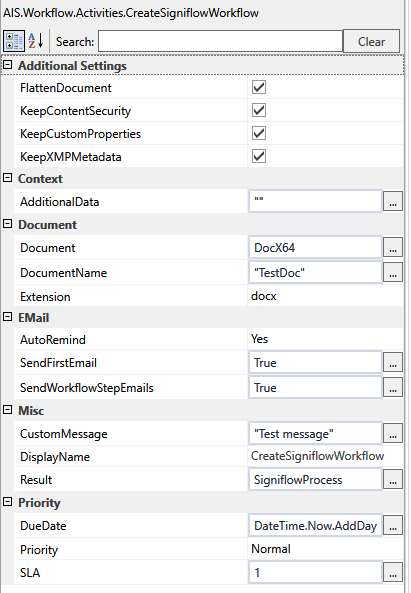
Configuration:
| Parameter | Data Type | Description |
|---|---|---|
DisplayName | String | Workflow activity display name. |
Result [Out] | FullWorklowRequest | SigniFlow workflow process definition instance. |
FlattenDocument | bool | Flatten all fields when signing. |
KeepContentSecurity | bool | Keep document content security when signing. |
KeepCustomProperties | bool | Keep custom document properties when signing. |
KeepXMLMetadata | bool | Keep embedded XMP metadata when signing. |
AdditionalData | String | Additional data to be used for the signature process.
|
Document [Required] | String | Document content in base64 format. |
DocumentName [Required] | String | The document template filename. |
Extension | DocExtension | Specifies document format. Available values:
|
AutoRemind | DocAutoRemind | Send reminders. Available values:
|
SendFirstEmail | bool | Send email to the first user. |
SendWorkflowStepsEmail | bool | Send an email on every user step completed. |
CustomMessage | String | Display message when the user opens the document for action. |
Priority | DocPriority | Process completion priority. Available values:
|
DueDate | DateTime | When document signature is expected to be completed. |
SLA | Integer | Defines the service level agreement priority. Available values: 1 to 8. |
| UseAutoTags | bool | Enable or disable the use of AutoTagging (Dynamic creation of fields based on the text in the document). E.g. A signature field for the first signer will be placed where the tag /s#1#200#60#-30#30/ appears in the document, with the settings:
|
AddSigniflowWorkflowUser
Adds a collaborating user to the signing process.
.png)
Configuration:
| Parameter | Data Type | Description |
|---|---|---|
SignatureWorkflow [Required] | FullWorklowRequest | Process definition instance. |
DisplayName | String | Workflow activity display name. |
Result [Out] | WorkflowUser | Resulting workflow user instance.
|
Action | Actions | Specify the user action for this document. Available values:
|
AllowProxy | ProxyAllowed | Allows or denies a user from nominating someone to sign on his behalf. Available values:
|
AutoSign | bool | Indicates if the document should be signed automatically by the first signatory. |
SignatureType | eSignatureType | Signature Type. Available values:
|
EmailAddress [Required] | String | Signatory's email address. |
MobileNumber | String | Signatory's mobile telephone number. |
SignReason | String | Reason for signing the document. |
SignerPassword | String | Signatory's password to sign the document. |
FirstName [Required] | String | User's first name. |
FullName [Required] | String | User's full name. |
LastName [Required] | String | User's last name. |
AddSigniflowUserField
Adds a field to the user to fill or take action on.
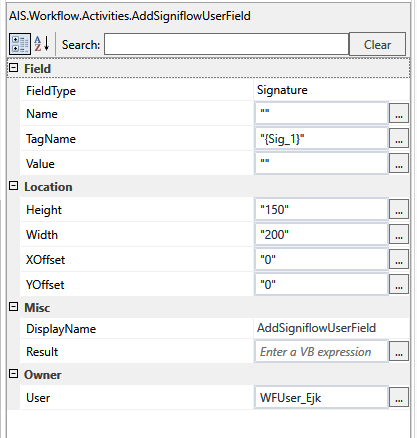
Configuration:
| Parameter | Data Type | Description |
|---|---|---|
FieldType | FieldType | SigniFlow Field type. Available values:
|
DisplayName | String | Workflow activity display name. |
Name | String | Field name to add. |
TagName [Required] | string | Tag text to search for in target document. |
Value | string | Initial field value. |
Width [Required] | String | Field width in pixels. |
Height [Required] | String | Field height in pixels. |
XOffset | String | Field Offset from x position in pixels. |
YOffset | String | Field Offset from Y position in pixels. |
User [Required] | String | Field owner.
|
Result [Out] | WorkflowUserField | Resulting field instance. |
InitiateSigniflowProcess
Start a signature signing process using the specified process object.
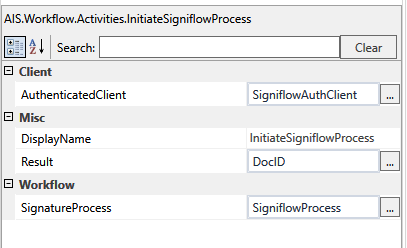
You must use the LogonToSigniflow activity before initiating the signing process.
Configuration:
| Parameter | Data Type | Description |
|---|---|---|
AuthenticatedClient [Required] | ISigniflowAuthenticatedClient | Authenticated client returned from LogonToSigniflow workflow activity. |
DisplayName | String | Workflow activity display name. |
SignatureProcess [Required] | FullWorkflowRequest | Defined SigniFlow process object. |
Result [Out] | Integer | Document ID returned from the initiated process. |
GetSigniflowDocumentStatus
Retrieves the document status for a given workflow.
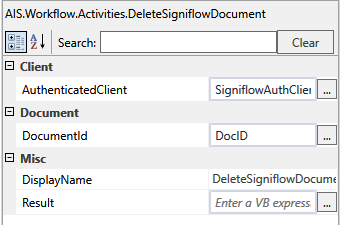
Configuration Settings:
| Parameter | Data Type | Description |
|---|---|---|
AuthenticatedClient [Required] | ISigniflowAuthenticatedClient | Authenticated client returned from LogonToSigniflow workflow activity. |
DisplayName | String | Workflow activity display name. |
DocumentId [Required] | Integer | Document ID returned from the InitiateSigniflowProcess activity. |
Result [Out] | Integer | The document status. |
GetSigniflowDocument
Retrieves the document for a given workflow.
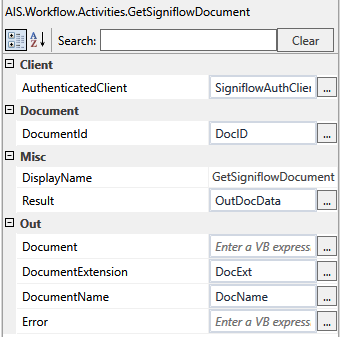
Configuration Settings:
| Parameter | Data Type | Description |
|---|---|---|
AuthenticatedClient [Required] | ISigniflowAuthenticatedClient | Authenticated client returned from LogonToSigniflow workflow activity. |
DisplayName | String | Workflow activity display name. |
DocumentId [Required] | Integer | Document ID returned from the InitiateSigniflowProcess activity. |
| Document [Out] | String | Base64 encoded document. |
| DocumentExtension [Out] | String | Document extension name. |
| DocumentName [Out] | String | The document filename. |
| Error [Out] | String | API Error code or message. |
Result [Out] | String | Base64 encoded document. |
DeleteSigniflowDocument
Removes a document.
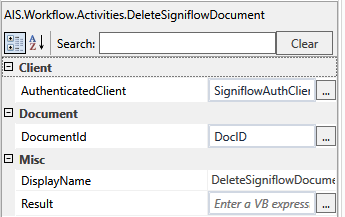
Configuration:
| Parameter | Data Type | Description |
|---|---|---|
AuthenticatedClient [Required] | ISigniflowAuthenticatedClient | Authenticated client returned from LogonToSigniflow workflow activity. |
DisplayName | String | Workflow activity display name. |
DocumentId [Required] | Integer | Document ID returned from the InitiateSigniflowProcess activity. |
Result [Out] | String | Status of the delete operation. |
CreateSigniflowGatewayAdditionalDataContext
Prepares the SigniFlow ADF (Additional Data Field) that is sent when initiating a workflow. This binds the callback/webhook context to a given endpoint that is registered on the DocFusion Signature Gateway.
By creating the ADF context, webhook notifications can be filtered to notify specific endpoints when events occur, such as Document Signed, Completed, Added, Cancelled etc. The result is used by the CreateSigniflowWorkflow activity.
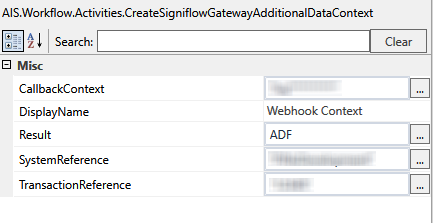
Configuration:
| Parameter | Data Type | Description |
|---|---|---|
CallbackContext [Required] | String | Callback context key provided by the DocFusion Signature Gateway when registering the client. |
DisplayName | String | Workflow activity display name. |
SystemReference [Required] | String | System filter. |
| TransactionReference[Required] | String | Transaction reference, such as a record ID from a source system. |
Result [Out] | String | ADF to be used. |
References