Once you install DocFusion Workbench, and open it for the first time, you will be prompted to activate the software before you can continue using it. This guide will show you how to complete the activation using the wizard. Your workstation needs internet access to complete this.
1. Start the activation wizard
Open Workbench. The Activation Wizard opens immediately if the software hasn't yet been activated.
If Workbench has already been activated, the ribbon-bar displays the range of DocFusion tools and you can continue using the software.

2. Enter your license details
When you arrive at the License Activation Details step of the wizard, select the Site Licensing tab.
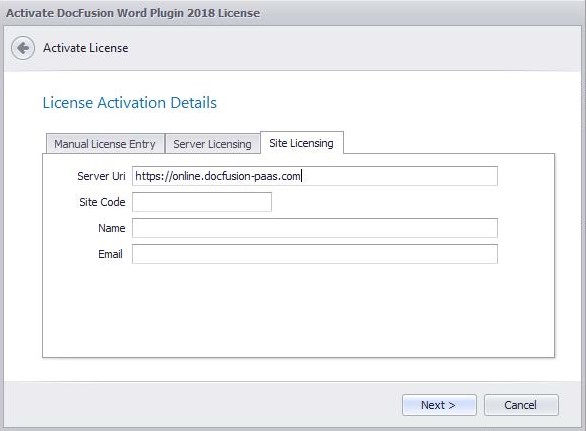
Enter the Server URI as https://online.docfusion-paas.com
Ensure you remove lagging characters and slashes: (“/”) from the URI.
Next, enter the Site Code that you were issued upon subscription.
Now, enter your Name and Email Address into the fields provided.
Click Next to advance the wizard. Activation may take a few minutes to complete.
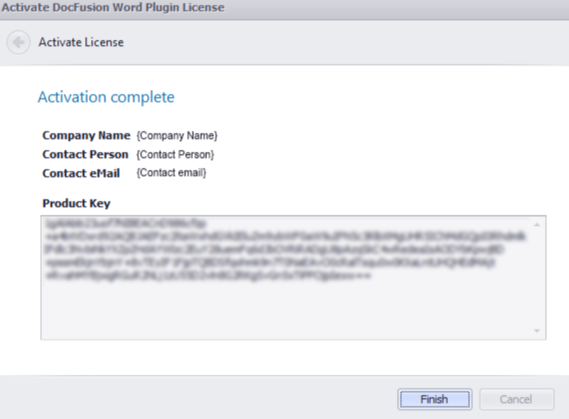
The wizard indicates whether product activation was successful by advancing to the Activation Complete step. If not, an error will be displayed, in which case you should click Back to address the error.
Click Finish to dismiss the wizard.
Register a server in Workbench to connect to your business unit and access your templates. Follow this guide...