The ability to reference existing content is a useful feature to eliminate repetition, and the errors that they create.
Referencing in DocFusion solves a common problem where business departments that maintain specific pieces of content are separate from those who use it in documentation. An example would be a disclaimer. Legal clauses are, of necessity, maintained by legal departments but it’s usually sales or service departments who issue documents with those disclaimers. By referencing the disclaimer content from legal departments that have control over it, all business documents that use it are always consistent with legal intent or company policy. Using references, consistency and integrity can be systematically built into the content of business documents.
Using the Reference Smart-Part, you can build the content of DocFusion templates from:
- Other DocFusion templates,
- Microsoft Office documents,
- Other external files,
- SharePoint libraries,
- HTML,
- and Binary values.
The diagram below shows how many departments in a business are invested in the content of a single document:
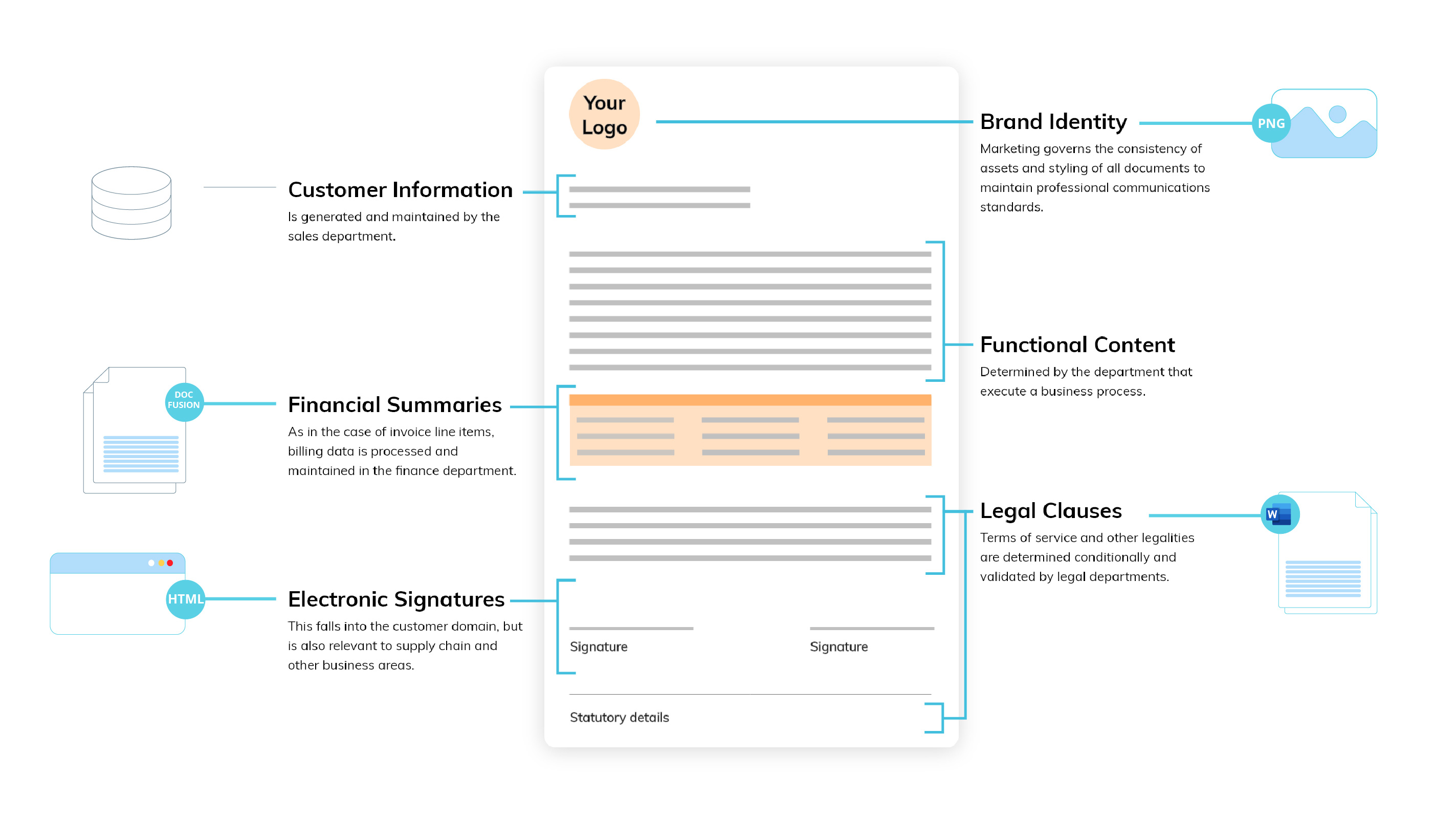
Using references simplifies the maintenance of content. It can be maintained in a single place, and then referred to, rather than being distributed across departments. This helps to maintain the consistency and integrity of content across document templates.
References in DocFusion also work together with the Library Element Smart Part, which allows you to reference specific pieces of content within a document. This allows you to create content libraries for use across all documentation. Typical use-cases for such functionality include consistency in marketing and branding, legal or policy clauses, and financial information.